


Windows Phone Thoughts - Daily News, Views, Rants and Raves

Be sure to register in our forums! Share your opinions, help others, and enter our contests.


Digital Home Thoughts

Loading feed...

Laptop Thoughts

Loading feed...

Android Thoughts

Loading feed...


All posts tagged "metro ui"


Thursday, February 17, 2011

Metro UI: Past, Present and Future

Posted by Richard Chao in "Windows Phone Software" @ 03:00 PM

http://windowsteamblog.com/windows_...-to-pixels.aspx

"...a summary of a talk the Windows Phone Design Team has given a couple times recently, on the history and the future of the Metro design language."

image

One of the first things that comes to mind when you pick up a Windows Phone 7 device is how simplistic yet effective Metro UI is. Its concept of glanceable live information on clean tiles without added chrome is refreshing. It is such a departure from every other competing OS who for the most part still use icon driven graphical user interface which apparently dates back to as early as 1945.

The presentation by the Windows Phone Design Team details the inspirations behind Metro. It is a good lesson in user interface design and a good primer on the origins of the modern GUI. It also gives us a hint of how they would like to see Metro evolve.

What do you think about Metro and how would you evolve it?

Wednesday, March 31, 2010

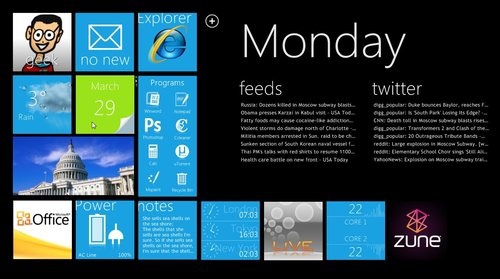
Experience Windows Phone 7 Series on your Windows Desktop with Omnimo UI

Posted by Eriq Cook in "Windows Phone Customizations & Content" @ 09:28 PM

http://www.engadget.com/2010/03/30/...h-phone-7-seri/

"Can't wait for Windows Phone 7 Series, but can't hack the emulator, either? Don't lose hope, Windows junkies -- you can still bring some semblance of WP7S order into your life with this Metro UI-inspired desktop HUD..."

Omnimo UI is an open-source Windows desktop customization tool based on Rainmeter, which will overlay your desktop with the look & feel of Windows Phone 7 Series. It's a pretty interesting tool and includes many useful widgets, shortcuts and "live" services including Gmail, Twitter, iTunes and more.

Omnimo UI is available for Windows XP, Vista and Windows 7. There's a detailed guide over at Lifehacker with desktop preparation and installation instructions.

Personally I've never installed a desktop customization tool and have to wonder how it affects overall Windows desktop performance. But I'm tempted to find a spare workstation and test it out (this wouldn't be a bad tool to use on a slate-style device).

Are any of you currently using Omnimo UI or plan on trying it out? Give us your feedback!


Reviews & Articles

Loading feed...

News

Loading feed...

Reviews & Articles

Loading feed...

News

Loading feed...

Reviews & Articles

Loading feed...

News

Loading feed...

Reviews & Articles

Loading feed...

News

Loading feed...

Reviews & Articles

Loading feed...

News

Loading feed...





